Blocking vs Non-Blocking Code in Node.js
I am a developer learning web development , I am a college dropout pursuing my passion in software field
One of the most important concepts in Node.js is understanding:
Blocking vs Non-Blocking Code
This is not just a syntax topic.
It directly affects:
server performance
scalability
responsiveness
concurrency
If you misunderstand this concept, you’ll eventually write slow backend systems that collapse under load.
In this blog, we’ll understand:
What blocking code means
What non-blocking code means
Why blocking slows servers
How Node.js handles async operations
Real-world examples using files and databases
First: Node.js Is Single-Threaded
JavaScript execution in Node.js happens on a single main thread.
That means:
Only one piece of JavaScript code executes at a time.
This creates an important challenge.
If one operation takes too long:
everything else waits
requests pile up
performance drops
This is exactly where blocking vs non-blocking matters.
What Is Blocking Code?
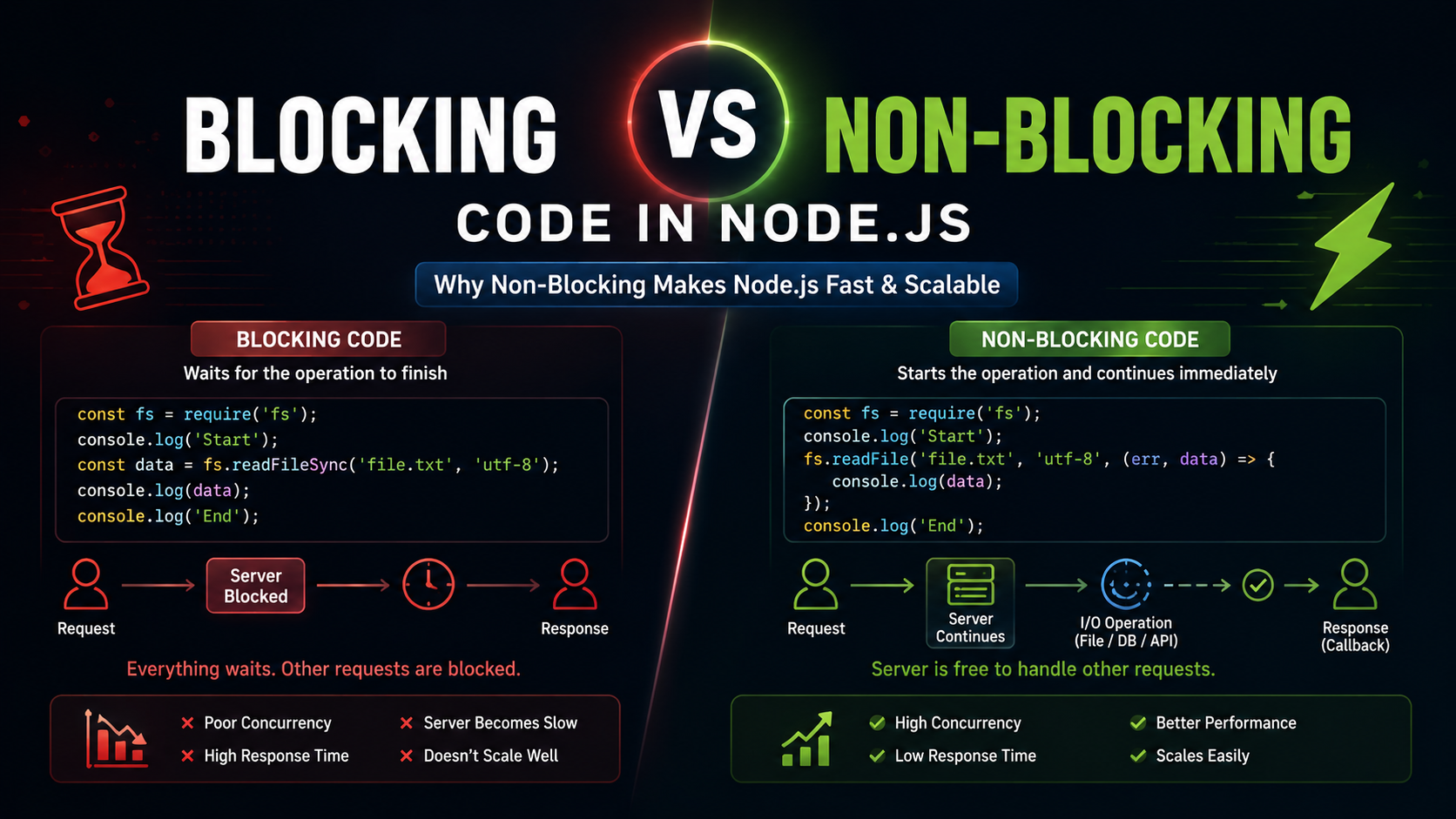
Blocking code stops further execution until the current operation finishes.
Example:
const fs = require("fs");

console.log("Start");

const data = fs.readFileSync("demo.txt", "utf-8");

console.log(data);

console.log("End");
Output:
Start
[file content]
End
Notice:
"End"
does NOT print until file reading completes.
Execution is blocked.
What Does “Blocking” Actually Mean?
It means:
JavaScript waits.
The thread becomes occupied doing one task.
Nothing else can execute during that time.
Imagine a restaurant with:
one chef
one order at a time
If the chef spends 20 minutes on one dish:
- all other customers wait
That’s blocking behavior.
Why Blocking Is Dangerous for Servers
Servers handle many users simultaneously.
Imagine:
User A requests a large file
server blocks for 5 seconds
User B arrives during that time
What happens?
User B must wait.
Even if their request is tiny.
This destroys scalability.
Real Server Problem Example
Suppose this endpoint exists:
app.get("/data", (req, res) => {

    const data = fs.readFileSync("hugeFile.txt", "utf-8");

    res.send(data);

});
If 100 users hit this route:
requests get blocked repeatedly
response times increase badly
server throughput drops
This is why blocking operations are dangerous in backend systems.
What Is Non-Blocking Code?
Non-blocking code allows Node.js to continue executing other tasks while waiting for slow operations.
Example:
const fs = require("fs");

console.log("Start");

fs.readFile("demo.txt", "utf-8", (err, data) => {

    console.log(data);

});

console.log("End");
Output:
Start
End
[file content]
This time:
"End"
prints immediately.
Node.js does NOT wait for the file read operation.
Waiting vs Continuing Execution
This is the core difference.
Blocking Code
Start task
WAIT...
Finish task
Continue execution
Non-Blocking Code
Start task
Continue execution immediately
Task finishes later
Handle result
Simple Analogy
Imagine ordering food online.
Blocking Style
You stand outside the restaurant waiting until food is ready.
You do nothing else.
Non-Blocking Style
You order food.
Then:
continue working
watch movies
study
do other tasks
When food is ready, you get notified.
Node.js works similarly.
How Node.js Handles Async Operations
When Node.js encounters async operations like:
file reading
database calls
network requests
timers
it offloads them to system-level mechanisms or worker threads.
Instead of blocking JavaScript:
operation starts
Node.js continues execution
operation finishes later
callback/promise executes
This is called:
Non-blocking asynchronous execution
File Handling Comparison
Blocking File Read
const data = fs.readFileSync("big.txt", "utf-8");

console.log(data);
Behavior:
JavaScript waits
thread blocked
server paused temporarily
Non-Blocking File Read
fs.readFile("big.txt", "utf-8", (err, data) => {

    console.log(data);

});
Behavior:
file reading happens asynchronously
JavaScript continues immediately
callback runs later
Database Call Example
Database operations are naturally slow.
Network communication takes time.
Bad Blocking Thinking
Imagine if database queries blocked the entire server.
Every user would wait for every query.
Performance would collapse instantly.
Actual Node.js Behavior
Example:
db.users.find({}, (err, users) => {

    console.log(users);

});
Node.js starts the DB request and moves on.
While database responds:
server can handle other users
other requests continue processing
This is the foundation of scalable backend systems.
Why Non-Blocking Improves Performance
Non-blocking systems maximize CPU efficiency.
Instead of sitting idle waiting:
Node.js processes other work
handles more requests
improves concurrency
This is why Node.js performs well for:
APIs
chat apps
streaming
real-time systems
high-concurrency applications
Important Clarification
Many beginners incorrectly think:
“Non-blocking means multiple JavaScript tasks run simultaneously.”
That’s not fully correct.
JavaScript execution itself is still single-threaded.
The important difference is:
slow operations happen outside the main execution flow
JavaScript thread remains mostly free
That’s what creates scalability.
Blocking vs Non-Blocking Comparison
| Feature | Blocking | Non-Blocking |
|---|---|---|
| Execution | Waits | Continues immediately |
| Thread Usage | Occupied | Mostly free |
| Scalability | Poor | High |
| Server Performance | Slower under load | Better concurrency |
| User Experience | Delays increase | More responsive |
| Common Style | Synchronous | Asynchronous |
Does Blocking Mean “Bad”?
Not always.
Blocking code can still be useful for:
scripts
startup initialization
small CLI tools
simple automation
Example:
const config = fs.readFileSync("config.json");
At application startup, this may be completely acceptable.
The problem begins in high-concurrency server environments.
Biggest Beginner Mistake
Many developers memorize:
Sync = bad
Async = good
Reality is more nuanced.
The real question is:
“Will blocking hurt concurrency in this scenario?”
Context matters.
Real Reason Node.js Became Popular
Node.js became successful largely because of:
Non-blocking I/O
Instead of creating massive numbers of threads like traditional systems:
Node.js uses async operations
event loop scheduling
non-blocking execution
This allows efficient handling of thousands of simultaneous connections.
Final Thoughts
Blocking vs non-blocking code is fundamentally about:
Whether JavaScript waits or continues execution.
Blocking code pauses the thread until work completes.
Non-blocking code starts work and continues immediately.
Key takeaways:
blocking operations reduce scalability
non-blocking operations improve concurrency
Node.js heavily relies on async non-blocking I/O
file reads and DB calls are common async examples
scalable servers depend on avoiding unnecessary blocking
Understanding this concept deeply is critical because almost every advanced Node.js topic eventually builds on top of it.


