Arrow Functions in JavaScript: A Simpler Way to Write Functions

I am a developer learning web development , I am a college dropout pursuing my passion in software field
So if u are fed up by writting the long syntax of the normal function with the function keyword, paranthesis and what not
Then u are at right place
In this blog we will see what are arrow function, A alternative way to write function
What are Arrow Functions?
An arrow function is a shorter way to write functions in JavaScript.
Instead of using the function keyword, arrow functions use the => syntax.
Think of arrow functions as a compact syntax for writing functions, especially when the function is small or used inline.
Normal function:

Arrow function:

Same logic but less verbose
Basic Arrow Function Syntax
The transformation from a traditional function to an arrow function is straightforward. You remove the function keyword and place an "arrow" (=>) between the parameters and the function body.
Normal function:

Arrow function:

Handling Parameters in Arrow functions
Arrow functions are flexible depending on how many arguments you need to pass.
- One Parameter
If your function has exactly one parameter, you can actually omit the parentheses entirely. This makes the code look incredibly clean.

Multiple Parameters
When you have two or more parameters (or zero parameters), the parentheses are required.
Implicit vs. Explicit Return
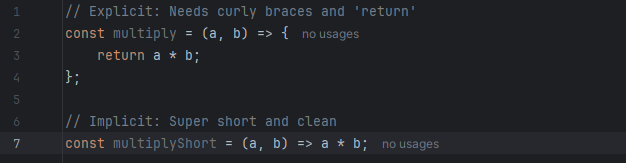
One of the most powerful features of arrow functions is the implicit return.
Explicit Return: You use curly braces
{}and thereturnkeyword. You must do this if your function has multiple lines of logic.Implicit Return: If your function is only one line, you can remove the curly braces and the
returnkeyword. The function will automatically return the result of that line.
Arrow Functions vs. Normal Functions
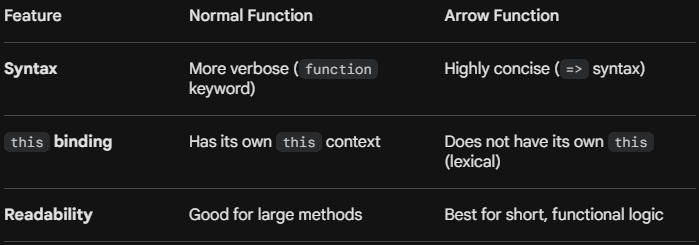
While they look similar, there are a few key differences to keep in mind: